How to cool passive NVIDIA GPUs (Tesla V100, P40) with a Dockerised Fan Controller
The NVIDIA Tesla V100 and Tesla P40 are passively cooled cards, designed for data centre chassis with high-volume front-to-back airflow. Used in a desktop workstation or a home server they will thermal throttle within minutes, because there are no onboard fans. This article describes a Dockerised solution that reads GPU temperatures via nvidia-smi and writes PWM fan speeds to an Aqua Computer OCTO fan controller via Linux's hwmon interface.
The source code is available at github.com/fgheorghe/ai-rig-gpu-fan-control.
Controller can be found at https://www.aquatuning.com/en/air-cooling/control-units/aquacomputer-octo-fan-controller-for-pwm-fan.
TL;DR;
Clone the repo, copy .env.template to .env, set your GPU UUIDs (from nvidia-smi -L) and fan channel numbers, then docker compose up -d. A bash script inside the container polls GPU temps every 15 seconds, interpolates a configurable fan curve, and writes the resulting PWM value to the OCTO's hwmon channels. Everything is configured via .env.
Motivation
Passively cooled data centre GPUs have become the cheapest way to get large amounts of VRAM for local LLM inference. A Tesla P40 with 24GB can be found for under 250 GBP, and a V100 32GB for roughly 500 GBP. The problem is that these cards ship without fans. Data centres solve this with chassis-level airflow driven by screaming 40mm fans at 15,000 RPM. In a desktop case or open-air test bench, you need to provide your own cooling.
The common approach is to strap 120mm fans directly to the heatsink with zip ties or 3D-printed shrouds, then run them at full speed permanently. This works but it is loud, wasteful, and offers no temperature-based control. A better approach is to connect the fans to a USB fan controller that exposes PWM channels via Linux's hwmon sysfs interface, then write a script that adjusts fan speed based on actual GPU temperature.
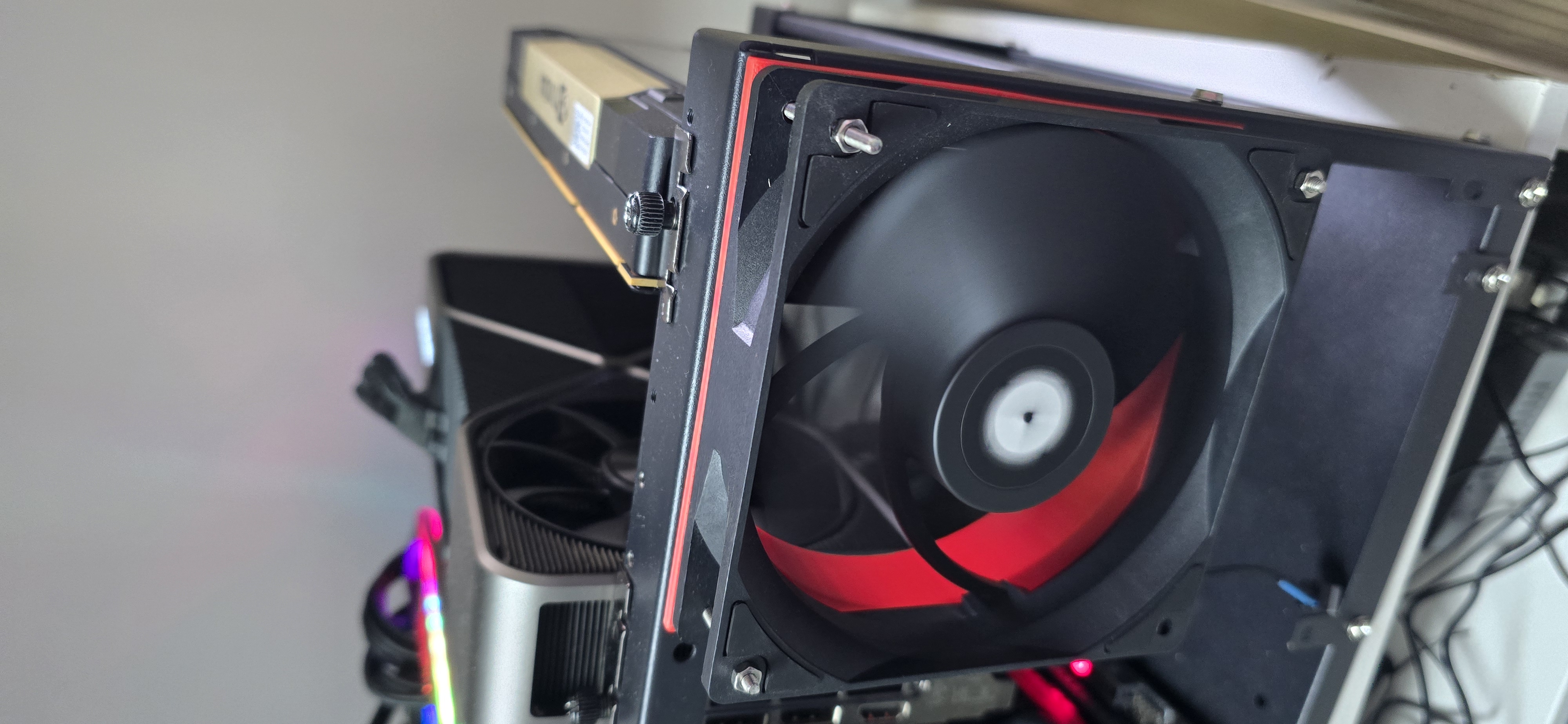
I designed and 3D Printed my own fan mount, attached to a mining rig frame. It blows air into my Tesla V100:
The Fan Controller
This project uses the Aqua Computer OCTO, an 8-channel PWM fan controller that connects over USB and is supported by the Linux liquidctl / hwmon kernel driver. Once connected, it appears as a hwmon device with entries like /sys/class/hwmon/hwmonN/pwm1 through pwm8, where each pwmN file accepts a value between 0 (off) and 255 (full speed).
To find it on your system:
for h in /sys/class/hwmon/hwmon*; do
    echo "$h: $(cat "$h/name" 2>/dev/null)"
    ls "$h"/pwm* 2>/dev/null | head -20
done
You are looking for a device with the name octo. The output will show you which pwmN channels are available, corresponding to the physical fan headers on the board. Note which fans are connected to which headers — you will need this for configuration.
How the Script Works
The core of the project is gpu_fan_curve.sh, a bash script that runs in a loop inside a Docker container. Each iteration does three things:
First, it reads the current temperature of every GPU visible to the container using nvidia-smi --query-gpu=temperature.gpu --format=csv,noheader,nounits and takes the maximum value. The container only sees the GPUs you pass in via NVIDIA_VISIBLE_DEVICES, so you control the scope by selecting GPU UUIDs in the .env file.
Second, it maps that temperature to a PWM value using linear interpolation across a configurable curve. The default curve is:
32°C → PWM 0   (fans off)
36°C → PWM 64  (~25%)
40°C → PWM 160 (~63%)
50°C → PWM 255 (full speed)
Temperatures between breakpoints are linearly interpolated. Below the lowest breakpoint, PWM is set to the lowest value (off). Above the highest, it clamps to the maximum (full speed).
Third, it writes the computed PWM value to every configured fan channel on the OCTO. It does this by writing to /sys/class/hwmon/hwmonN/pwmX for each channel specified in the configuration. Before writing, it checks that the channel is in manual mode (pwmX_enable = 1) and sets it if not.
If nvidia-smi fails to return temperatures (driver crash, GPU hang), the script activates a failsafe and sets all fans to maximum speed.
Docker Container
The script runs inside a minimal NVIDIA CUDA container. The Dockerfile is straightforward:
FROM nvidia/cuda:12.6.0-base-ubuntu24.04

RUN apt-get update && \
    apt-get install -y --no-install-recommends bash coreutils && \
    rm -rf /var/lib/apt/lists/*

COPY gpu_fan_curve.sh /usr/local/bin/gpu_fan_curve.sh
RUN chmod +x /usr/local/bin/gpu_fan_curve.sh

CMD ["bash", "-c", "while true; do /usr/local/bin/gpu_fan_curve.sh; sleep ${POLL_INTERVAL:-15}; done"]
The NVIDIA base image provides nvidia-smi. The CMD runs the script in a simple loop, sleeping for POLL_INTERVAL seconds between iterations (default 15). No cron, no daemon — just a loop. Docker handles restart, logging, and lifecycle.
The docker-compose.yml mounts the host's hwmon sysfs tree into the container, passes through the selected GPUs via the NVIDIA runtime, and runs in privileged mode (required for writing to sysfs PWM paths):
name: ${COMPOSE_PROJECT_NAME:-gpu-fan-control}

services:
  gpu-fan-controller:
    build: .
    container_name: gpu-fan-controller
    restart: unless-stopped
    runtime: nvidia
    env_file: .env
    environment:
      - NVIDIA_VISIBLE_DEVICES=${GPU_UUIDS}
    volumes:
      - /sys/class/hwmon:/sys/class/hwmon
    privileged: true
The runtime: nvidia line requires the NVIDIA Container Toolkit to be installed and the nvidia runtime registered in /etc/docker/daemon.json. See How to install drivers for NVIDIA Tesla V100 on Fedora 44 for setup instructions.
Configuration
All configuration lives in a single .env file. Copy .env.template to .env and edit:
# Project name for docker compose
COMPOSE_PROJECT_NAME=gpu-fan-control

# GPU UUIDs to monitor (from nvidia-smi -L)
GPU_UUIDS=GPU-b637a35e-f36d-8f0a-ae09-b6935db93389

# Which PWM channels on the OCTO to control (comma-separated)
FAN_PWM_CHANNELS=1,2,3,4

# Fan curve: matched pairs of temperature (°C) and PWM value (0-255)
FAN_CURVE_TEMPS=32,36,40,50
FAN_CURVE_PWM=0,64,160,255

# PWM value if nvidia-smi fails
FAILSAFE_PWM=255

# How often to poll GPU temps (seconds)
POLL_INTERVAL=15
GPU_UUIDS determines which GPUs the container can see. Get the UUIDs by running nvidia-smi -L on the host. You can pass multiple UUIDs separated by commas. The script always takes the maximum temperature across all visible GPUs, so if you have a V100 and a P40 cooled by the same set of fans, pass both UUIDs and the fans will respond to whichever card is hotter.
FAN_PWM_CHANNELS controls which physical fan headers on the OCTO receive the PWM signal. If you have four fans strapped to your GPU heatsinks and they are connected to headers 1 through 4 on the OCTO, set this to 1,2,3,4. If you only use header 1, set it to 1. All specified channels receive the same PWM value.
FAN_CURVE_TEMPS and FAN_CURVE_PWM define the fan curve as matched pairs. Both must have the same number of entries, and temperatures must be in ascending order. The defaults keep fans off below 32°C, ramp gradually through the mid range, and hit full speed at 50°C. For a more aggressive curve, you might use 28,35 and 0,255 — fans off below 28°C, full blast at 35°C. For a quieter system, extend the ramp: 30,40,50,60 and 0,60,160,255.
POLL_INTERVAL sets the sleep duration between checks. 15 seconds is a reasonable default. GPU temperatures change slowly under sustained load, so polling more frequently than every 5 seconds offers little benefit.
Running
git clone https://github.com/fgheorghe/ai-rig-gpu-fan-control.git
cd ai-rig-gpu-fan-control
cp .env.template .env
# Edit .env with your GPU UUIDs and fan channel numbers
docker compose up -d
Check that it is working:
docker compose logs -f
Expected output:
gpu-fan-controller  | 2026-05-20 12:00:15 - Max GPU temp: 34°C → PWM: 32/255 (~12%) [channels: 1,2,3,4]
gpu-fan-controller  | 2026-05-20 12:00:30 - Max GPU temp: 36°C → PWM: 64/255 (~25%) [channels: 1,2,3,4]
gpu-fan-controller  | 2026-05-20 12:00:45 - Max GPU temp: 42°C → PWM: 179/255 (~70%) [channels: 1,2,3,4]
The container restarts automatically on reboot (restart: unless-stopped), so once it is running, it stays running.
Conclusion
Passively cooled data centre GPUs are cheap and capable, but they need active cooling in anything other than a purpose-built server chassis. A USB fan controller like the Aqua Computer OCTO, combined with a simple bash script running in a Docker container, provides temperature-reactive fan control with no dependencies beyond nvidia-smi and Linux hwmon. The entire configuration lives in a .env file, making it easy to adjust fan curves, select GPUs, and choose fan channels without touching the script itself.