How to run SketchUp 2025 on Linux using Steam and GE Proton
The last version of SketchUp known to work on Linux was the 2017 release. This blog post is an early draft documenting how to install and run SketchUp 2025 on Linux using Steam and GE-Proton. A working Windows installation of SketchUp is required, as the SketchUp installer fails when run through Proton. The workaround involves copying files from an existing Windows installation and applying Proton configuration changes. Ideally, someone with deeper knowledge of these tools will refine this draft into something better.
Step 1: Install Steam and enable steam play for all titles as per: https://itsfoss.com/steam-play/
Step 2: Download GE-Proton10-25 from https://github.com/GloriousEggroll/proton-ge-custom/releases and extract it into: ~/.var/app/com.valvesoftware.Steam/.local/share/Steam/compatibilitytools.d/ or wherever Steam installs compatibilitytools.d on your distro. Restart steam once extracted.
Step 3: Create a dummy non steam game using this path as the executable:/usr/bin/ls.
Step 4: Locate the "ls" app in your steam library and configure the GE-Proton10-25 compatibility layer for this new app.
Step 5: On the command line issue the following command: tail -f ~/.var/app/com.valvesoftware.Steam/.local/share/Steam/logs/compat_log.txt. Use find ~/ -name compat_log.txt if the file is in a different path.
Step 6: Run the dummy app to ensure the proton environment is created for this app.
Step 7: On the command line the tail command should show something similar to:OnAppLifetimeNotification: release session(s) for appID (I.e.: OnAppLifetimeNotification: release session(s) for appID 3255798437 -> note 3255798437, as this will be YOU APP ID).
Step 8: Change your current directory to:".var/app/com.valvesoftware.Steam/.local/share/Steam/steamapps/compatdata/[YOUR APP ID]/pfx/drive_c/Program Files" or wherever steam installs your apps.
Step 9: Copy the contents of your windows installed SketchUp directory to this directory ^.
Step 10: On the command line issue:
flatpak run com.github.Matoking.protontricks [YOUR APP ID] mfc140 vcrun2019 corefonts d3dx9_43 d3dcompiler_43 uiautomation
flatpak run com.github.Matoking.protontricks [YOUR APP ID] win10
Step 11: Change your current directory to:
"~/.var/app/com.valvesoftware.Steam/.local/share/Steam/steamapps/compatdata/[YOUR APP ID]/pfx/drive_c/Program Files/SketchUp 2025/SketchUp"
Step 12: Copy the following files as for whatever reason these are not found, despite installing vcrun2019:
cp ../../../windows/system32/msvcp140*.dll ./
cp ../../../windows/system32/vcruntime140*.dll ./
Step 13: Run SketchUp (it will crash the first time, will revert to the "classic rendering engine", and then restart it):
export WINEPREFIX=~/.var/app/com.valvesoftware.Steam/.local/share/Steam/steamapps/compatdata/[YOUR APP ID]/pfx
PROTON_USE_WINED3D=0 DISABLE_VK_LAYER_VALVE_steam_overlay_1=1 WINEDEBUG=+loaddll ~/.var/app/com.valvesoftware.Steam/.local/share/Steam/compatibilitytools.d/GE-Proton10-25/files/bin/wine64 SketchUp.exe
NOTE: In my initial tests the app would crash upon first run as the new engine couldn't be used. As user colin from the SketchUp team points out (https://forums.sketchup.com/t/sketchup-pro-linux-support/223371/59) SketchUp's new rendering engine requires DX12, which is already provided by Proton. The env var PROTON_USE_WINED3D=0 ensures that this version of DirectX is used.
If on the command line you see errors similar to below, it means msvcp140*.dll is somehow corrupt. Copy it from somewhere else:
0024:err:module:import_dll Library MSVCP140_1.dll (which is needed by L"C:\\Program Files\\SketchUp 2025\\SketchUp\\Qt6Core.dll") not found
0024:err:module:import_dll Library Qt6Core.dll (which is needed by L"C:\\Program Files\\SketchUp 2025\\SketchUp\\Qt6Gui.dll") not found
0024:err:module:import_dll Library MSVCP140_1.dll (which is needed by L"C:\\Program Files\\SketchUp 2025\\SketchUp\\Qt6Gui.dll") not found
0024:err:module:import_dll Library MSVCP140_2.dll (which is needed by L"C:\\Program Files\\SketchUp 2025\\SketchUp\\Qt6Gui.dll") not found
0024:err:module:import_dll Library Qt6Gui.dll (which is needed by L"C:\\Program Files\\SketchUp 2025\\SketchUp\\Qt6Widgets.dll") not found
0024:err:module:import_dll Library MSVCP140_1.dll (which is needed by L"C:\\Program Files\\SketchUp 2025\\SketchUp\\Qt6Core.dll") not found
0024:err:module:import_dll Library Qt6Core.dll (which is needed by L"C:\\Program Files\\SketchUp 2025\\SketchUp\\Qt6Widgets.dll") not found
Step 14: The final step is to rename the "ls" app to "SketchUp 2025", and to set the correct Target, Start In and Launch Options in Steam:
Target: "/YOUR HOME DIRECTORY/.var/app/com.valvesoftware.Steam/.local/share/Steam/steamapps/compatdata/YOUR APP ID/pfx/drive_c/Program Files/SketchUp 2025/SketchUp/SketchUp.exe"
Start In: "/YOUR HOME DIRECTORY/.var/app/com.valvesoftware.Steam/.local/share/Steam/steamapps/compatdata/YOUR APP ID/pfx/drive_c/Program Files/SketchUp 2025/SketchUp/"
Launch Options: PROTON_USE_WINED3D=0 DISABLE_VK_LAYER_VALVE_steam_overlay_1=1 WINEDEBUG=+loaddll %command%
SketchUp is a Qt app and a Linux build should be possible. Ideally, as Linux adoption continues to grow, Trimble would ensure it runs smoothly with Steam and Proton, if not release a native Linux version. Otherwise, in their quest to abandon Windows, users will increasingly turn to popular alternatives like FreeCAD or OnShape.
I spent one hour getting this to work and the result is a working setup and a hacky tutorial. Would be interesting to have someone with more knowledge of Proton's internals improve it.
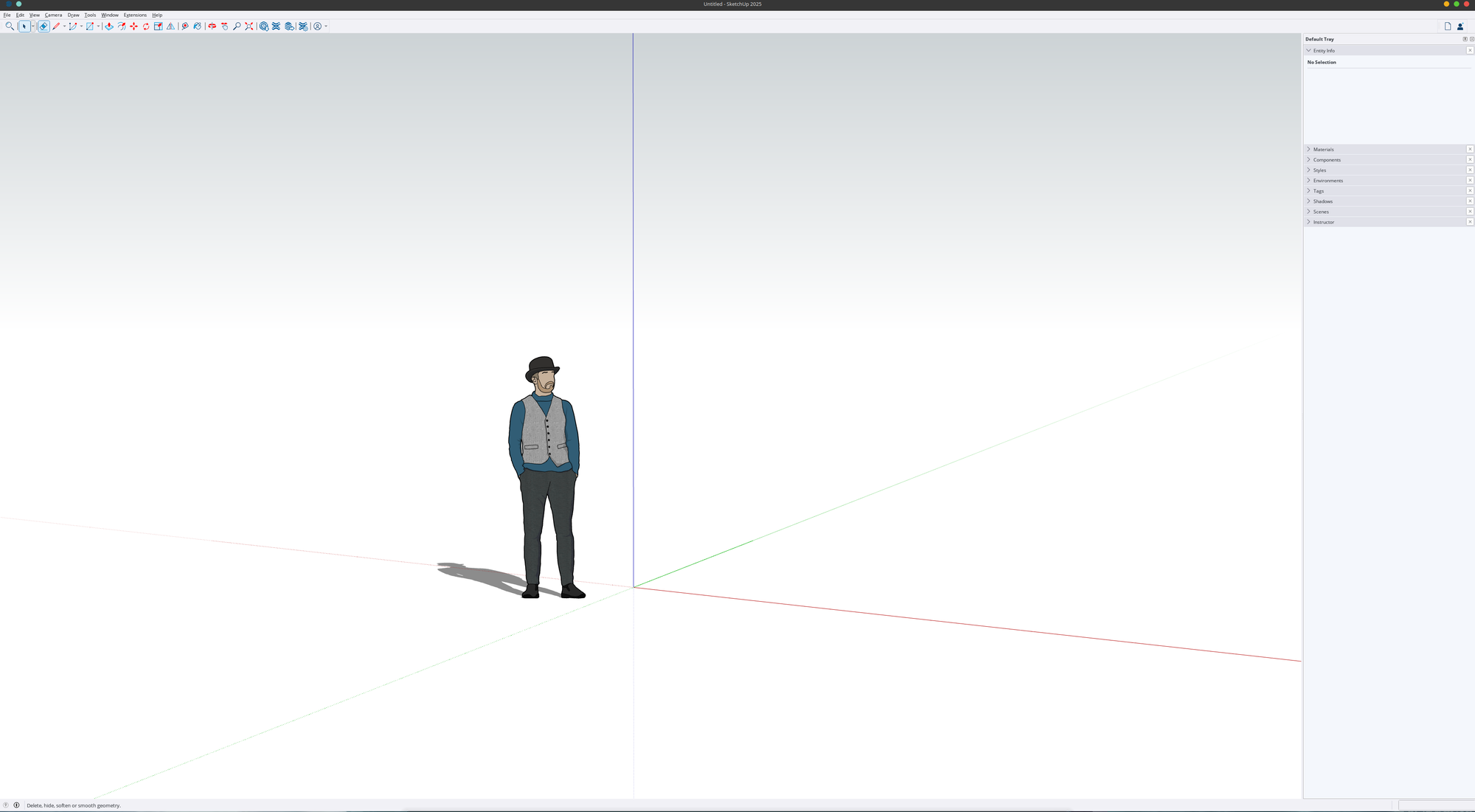
Here is a screenshot of SketchUp 2025 on Linux (Fedora Kinoite 43):