How to Reduce AMD R9700 AI PRO GPU Power Usage by 17% for AI Inference with a Dockerised Controller
Running four AMD Radeon AI PRO R9700 GPUs at stock 300W each for local AI inference is wasteful. Like NVIDIA GPUs, AI inference workloads are memory-bandwidth bound, not compute bound. The GPU cores spend most of their time waiting for data from VRAM, burning power for no performance gain. This article describes the AMD-specific version of the same Dockerised power management tool covered in How to Reduce NVIDIA GPU Power Usage and Clock Speeds for AI Inference with a Dockerised Controller, adapted for RDNA4 GPUs using Linux sysfs instead of nvidia-smi.
The source code is available on the amd branch at github.com/fgheorghe/ai-rig-gpu-cpu-power-limits.
Note: As with the NVIDIA version, no firmware or VBIOS is modified. All settings are runtime changes via sysfs and are reset on reboot. The container is configured with restart: unless-stopped, so starting it with docker compose up -d ensures it reapplies the settings automatically on every system restart, making the configuration persistent across reboots with no manual intervention.
TL;DR
Clone the repo, checkout the amd branch, copy config.ini.template to config.ini, set your PCI slot addresses (from lspci -D | grep VGA) and desired limits, then docker compose up -d. A bash script inside the container iterates over numbered [gpu:N] sections, matches each PCI slot to a card in /sys/class/drm/, and applies power caps via the hwmon sysfs interface and optional overdrive settings via pp_od_clk_voltage. If a value is omitted, the GPU reverts to its factory default for that setting.
Note: The config.ini.template contains detailed instructions on enabling the kernel parameter (amdgpu.ppfeaturemask=0xfffd7fff) required for the overdrive settings (sclk_offset, mclk, vddgfx_offset), including verification commands. Read it before configuring these values.
The Hardware
This was developed on an ASUS Pro WS WRX80E-SAGE SE WIFI with a Threadripper PRO 3945WX and four Sapphire Radeon AI PRO R9700 GPUs (32GB GDDR6 each, RDNA4/Navi 48) connected over PCIe 5.0. Each card draws 300W at stock with a boost clock of 2920 MHz (though in practice they boost well above this - mine reach ~3250 MHz).
The minimum power cap accepted by the R9700 can be found with:
cat /sys/class/drm/card0/device/hwmon/hwmon*/power1_cap_min
On my cards, the minimum is 210W.
How It Differs from the NVIDIA Version
The NVIDIA version uses nvidia-smi for everything. On AMD, there is no single tool - the driver exposes controls through sysfs files under /sys/class/drm/cardN/device/. The key differences:
- GPU identification: PCI slot addresses (
lspci -D | grep VGA) instead of NVIDIA UUIDs (nvidia-smi -L). - Power cap: Written directly to
hwmon/power1_capin microwatts (the script converts from watts in the config). - Clock/voltage control: Written to
pp_od_clk_voltageusing the RDNA4-specific offset syntax, rather than absolute clock values. - No persistence mode: AMD GPUs don't need an equivalent of
nvidia-smi -pm 1. - Container: No
runtime: nvidianeeded. Justprivileged: truefor sysfs write access.
The container image is minimal - Ubuntu 24.04 with just crudini for INI parsing. No ROCm or AMD tools required.
The Configuration File
GPU settings are stored in an INI file with numbered sections. Each section identifies a GPU by PCI slot address and optionally specifies power and overdrive settings:
[gpu:0]
pci_slot=0000:03:00.0
max_wattage=210
;sclk_offset=-200
;mclk=1100
;vddgfx_offset=-100
The available settings:
pci_slot(required) - PCI bus address fromlspci -D | grep VGA.max_wattage- Power cap in watts. Written tohwmon/power1_cap. No kernel parameter needed. If omitted, resets to factory default.sclk_offset- GPU core clock offset in MHz. Range on R9700: -500 to +1000. Negative values underclock.mclk- Memory clock in MHz. State 1 value (default 1259 MHz on R9700). Reducing this directly impacts inference throughput.vddgfx_offset- GPU voltage offset in mV. Range: -200 to 0. Reduces power draw without changing clocks. Reducing this may cause instability. Monitor closely. In my testing, -100mV caused silent compute errors under sustained inference load, leading to GPU hangs and worker stalls.
The last three settings all require amdgpu.ppfeaturemask=0xfffd7fff as a kernel parameter to enable the overdrive sysfs interface. Without it, pp_od_clk_voltage does not exist and only the power cap will work.
To enable overdrive:
sudo grubby --update-kernel=ALL --args="amdgpu.ppfeaturemask=0xfffd7fff"
sudo reboot
To verify:
printf 'ppfeaturemask: 0x%x\n' "$(cat /sys/module/amdgpu/parameters/ppfeaturemask)"
ls /sys/class/drm/card*/device/pp_od_clk_voltage
sudo dmesg | grep -i overdrive
The script checks the ppfeaturemask at startup and reports whether overdrive is enabled.
RDNA4 Overdrive Syntax
RDNA4 handles clock offsets differently from older AMD generations and from NVIDIA. Instead of setting absolute clock values, the driver exposes OD_SCLK_OFFSET - a relative offset from the GPU's boost clock curve.
To see the available ranges:
cat /sys/class/drm/card0/device/pp_od_clk_voltage
On the R9700 this shows:
OD_SCLK_OFFSET: 0Mhz
OD_MCLK:
0: 97Mhz
1: 1259MHz
OD_RANGE:
SCLK_OFFSET:    -500Mhz       1000Mhz
MCLK:      97Mhz       1500Mhz
VDDGFX_OFFSET:    -200mv          0mv
OD_VDDGFX_OFFSET: 0mV
The script writes these values using the sysfs OD interface (s, m 1, vo commands) and commits with c. It always resets OD values before applying new ones, so stale settings from a previous run cannot persist.
When any overdrive setting is active, the script sets power_dpm_force_performance_level to manual. When all overdrive settings are removed, it resets to auto.
What I Tested and What I Found
The inference workload was vLLM serving a Qwen3.6 model with speculative decoding across all four GPUs with TP=4. Generation throughput (tokens per second) is the metric that matters.
Baseline: 300W Stock
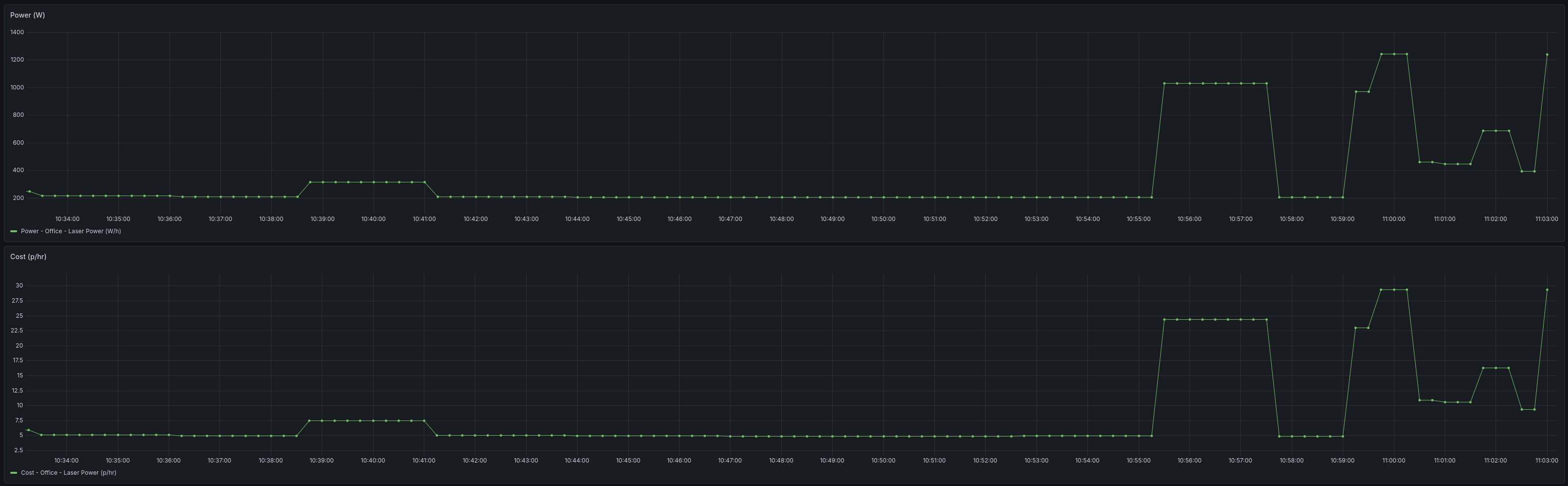
Total system draw: 1248W. Generation throughput: ~44 tok/s.
Energy draw at stock settings (visible at 11:00):
210W Power Cap Only
Total system draw: ~1050W. Generation throughput: ~44 tok/s. No measurable loss.
This confirms inference is entirely memory-bandwidth bound on these cards. The 210W cap saves ~200W with zero performance impact.
210W + SCLK Offset -500MHz
Total system draw: 1035W. Generation throughput: ~40 tok/s. About 9% throughput loss.
The max SCLK offset saves an additional ~15W over the power cap alone. Not a great trade for a 9% speed reduction, but still acceptable for a workload that runs 24/7.
210W + VDDGFX Offset -100mV
Total system draw: 1049W. Generation throughput: ~42.5 tok/s initially, but the GPUs hung under sustained load. The -100mV undervolt caused silent compute errors leading to worker stalls. This setting was not stable on the R9700 at -100mV. A milder -50mV may work but was not tested.
Final Settings
The configuration I settled on is 210W power cap with -500MHz SCLK offset on all four GPUs:
| Config | Total Power | Gen tok/s | Savings |
|---|---|---|---|
| 300W stock | 1248W | ~44 | — |
| 210W + sclk -500 | 1035W | ~40 | 213W (17%) |
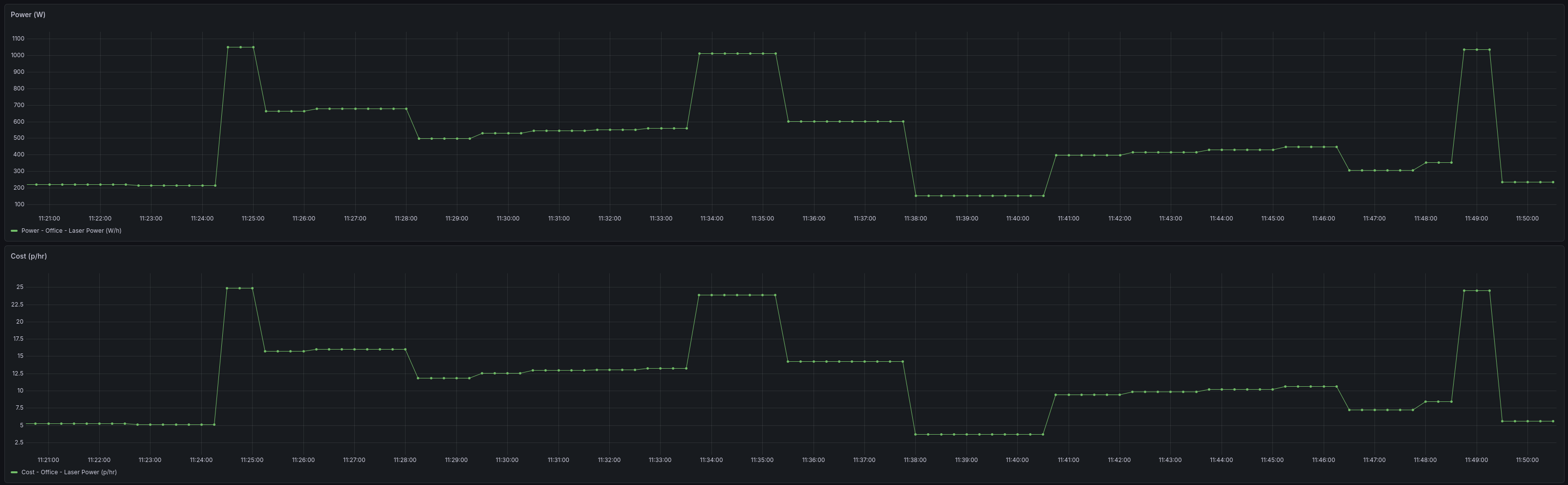
Saving 213W continuously at UK electricity rates (~30p/kWh) amounts to roughly £36/month, or about 5 days of "free" inference per month.
Energy draw after applying the final settings (visible at 11:49):
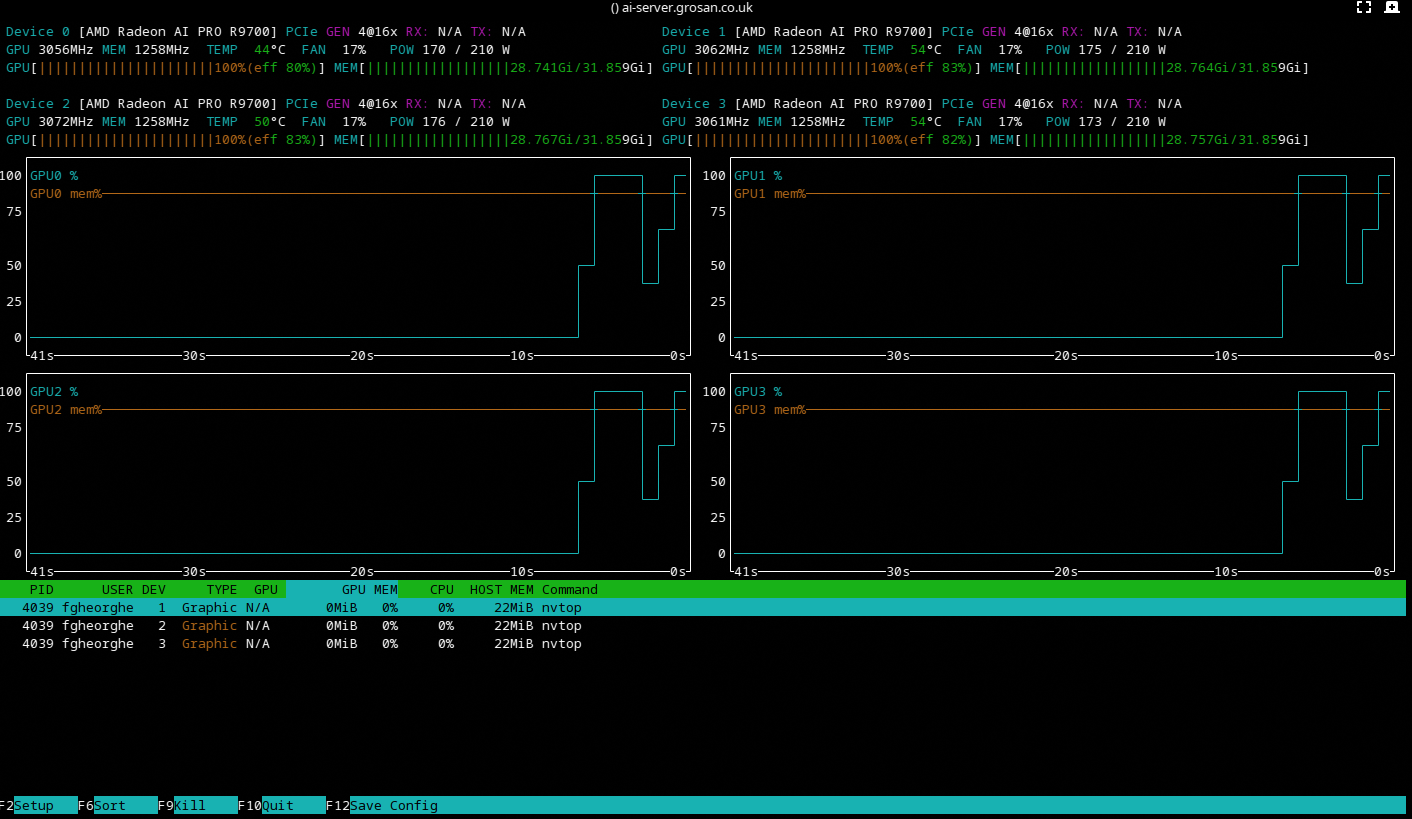
nvtop confirms all four GPUs running within their power values at the final settings:
Running
git clone https://github.com/fgheorghe/ai-rig-gpu-cpu-power-limits.git
cd ai-rig-gpu-cpu-power-limits
git checkout amd
cp config.ini.template config.ini
# Edit config.ini with your PCI slots and power limits
docker compose up -d
Check that it is working:
docker compose logs -f
Expected output:
gpu-cpu-power-limits  | applying gpu power config...
gpu-cpu-power-limits  | overdrive enabled (ppfeaturemask=0xfffd7fff)
gpu-cpu-power-limits  | === gpu:0 (0000:03:00.0) ===
gpu-cpu-power-limits  |   setting power cap to 210W
gpu-cpu-power-limits  |   resetting OD before applying
gpu-cpu-power-limits  |   perf level -> manual
gpu-cpu-power-limits  |   SCLK offset -500MHz
gpu-cpu-power-limits  | === gpu:1 (0000:2d:00.0) ===
gpu-cpu-power-limits  |   setting power cap to 210W
gpu-cpu-power-limits  |   resetting OD before applying
gpu-cpu-power-limits  |   perf level -> manual
gpu-cpu-power-limits  |   SCLK offset -500MHz
gpu-cpu-power-limits  | done, configured 4 gpu(s)
gpu-cpu-power-limits  | gpu config applied, idling
To verify settings on the host:
# Power cap
cat /sys/class/drm/card0/device/hwmon/hwmon*/power1_cap

# Overdrive values
cat /sys/class/drm/card0/device/pp_od_clk_voltage

# Current clock under load (Hz, divide by 1000000 for MHz)
cat /sys/class/drm/card0/device/hwmon/hwmon*/freq1_input
Conclusion
The same principle from the NVIDIA version applies: stock GPU power settings are designed for peak gaming performance, not sustained AI inference. On RDNA4, the sysfs interface gives fine-grained control over power caps, clock offsets, memory clocks, and voltage - though stability varies by card and setting. The power cap alone delivered the biggest win: a 200W reduction with zero throughput loss. The SCLK offset added marginal savings at the cost of some speed. The voltage offset was unstable at -100mV on the R9700.
As with the NVIDIA version, there is no one-size-fits-all answer. The minimum power cap, the stability of voltage offsets, and the point where clocks start affecting throughput will all vary by GPU model and workload. Measure, adjust, and settle on what works for your setup.