How to Reduce NVIDIA GPU Power Usage and Clock Speeds for AI Inference with a Dockerised Controller
Running multiple GPUs for local AI inference at stock power settings is wasteful. Consumer cards like the RTX 3090 draw 350W by default, but AI inference workloads are typically memory-bandwidth bound, not compute bound. The GPU cores spend much of their time waiting for data, burning power for no performance gain. Reducing power limits and clock speeds lowers electricity costs, temperatures, and fan noise, while extending hardware lifespan - all without sacrificing inference speed. This article describes a Dockerised solution that reads per-GPU power and clock settings from an INI configuration file and applies them at container startup using nvidia-smi, persisting across reboots with no manual intervention.
The source code is available at github.com/fgheorghe/ai-rig-gpu-cpu-power-limits.
Note: The power and clock settings applied by this tool are not permanent. They are runtime changes made via nvidia-smi and are reset every time the system reboots or the GPU driver is reloaded. No firmware or VBIOS is modified. The container simply reapplies the settings on every startup, so removing it restores the GPUs to their factory defaults on the next reboot.
TL;DR
Clone the repo, copy config.ini.template to config.ini, set your GPU UUIDs (from nvidia-smi -L) and desired power/clock limits, then docker compose up -d. A bash script inside the container iterates over numbered [gpu:N] sections, matches each UUID to the physical device, enables persistence mode, and applies the configured wattage and clock limits. If a value is omitted, the GPU reverts to its factory default for that setting. The container then idles indefinitely, restarting on boot to reapply the settings automatically.
Motivation
A multi-GPU AI inference rig does not need to run every card at full power. AI inference is heavily memory-bandwidth bound. The GPU cores are rarely the bottleneck, the memory bus is. This means power can be reduced significantly before inference throughput is affected.
On Linux there is no MSI Afterburner. The standard tool is nvidia-smi, which can set power limits (-pl) and lock clock speeds (-lgc). The problem is that these settings do not persist across reboots. A systemd service is the typical solution, but if the rest of the AI stack already runs in Docker, it makes sense to keep the power configuration containerised as well. This also makes the setup portable: clone the repo on a new machine, edit the config, and docker compose up. The container runs indefinitely rather than exiting after applying settings, because in future versions I will add CPU frequency scaling, component-level idle detection, and the ability to dynamically disable hardware when the system is not in use (ie PLX fan, or the GPUs themselves).
This project is a companion to How to cool passive NVIDIA GPUs (Tesla V100, P40) with a Dockerised Fan Controller, which handles the thermal side of the same problem.
The Hardware
The rig this was developed on has three GPUs on PCIe 3.0:
- GPU 0: NVIDIA GeForce RTX 3090 (Founders Edition) - 350W TDP, 350W max
- GPU 1: NVIDIA GeForce RTX 3090 (Palit GameRock) - 350W TDP, 370W max
- GPU 2: Tesla V100-PCIE-32GB - 250W TDP, 250W max
Both 3090 variants have the same 350W default power limit. The Palit GameRock allows up to 370W for overclocking headroom, but the Founders Edition is locked at 350W. The V100 is a data centre card with a fixed 250W ceiling.
The minimum power limit that nvidia-smi accepts on both the RTX 3090 and the V100 is 100W.
Finding the Sweet Spot
The goal is to find the lowest power limit that does not reduce inference throughput. The approach is simple: set a limit, run a repeatable inference benchmark, and compare against stock. Walk the wattage down until throughput drops, then step back.
The benchmark used throughout is llama.cpp running Qwen 3.6 35B A3B MTP in two configurations side by side: the two RTX 3090s running a Q8 quantisation (left), and the V100 running a Q4 quantisation (right). Tokens per second is the metric.
Baseline: Stock Settings
First, a baseline at stock power (350W per 3090, 250W for the V100) to establish the reference throughput:
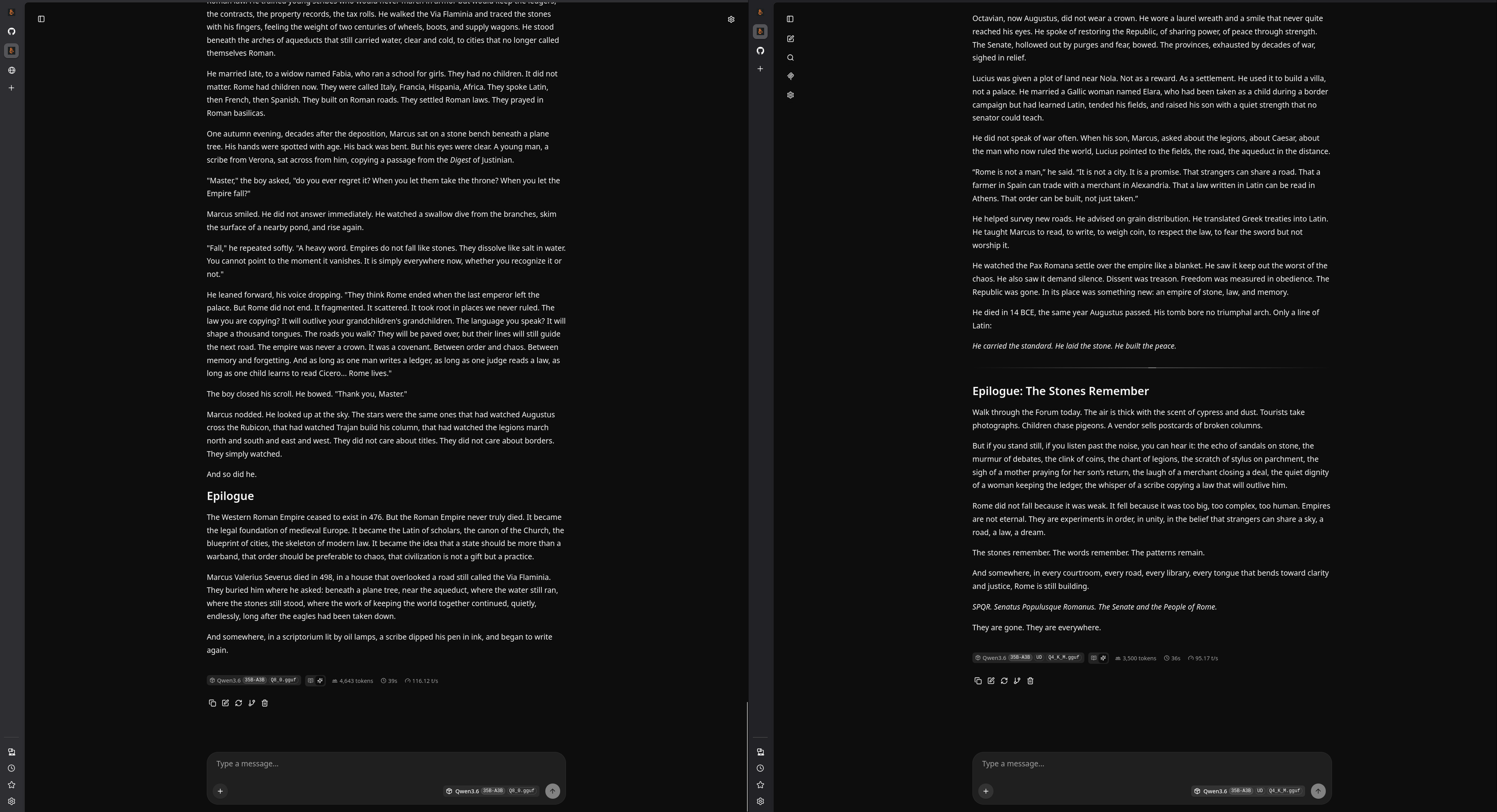
First Iteration: 280W / 200W
The first conservative pass set the 3090s to 280W with clocks locked at 1800MHz, and the V100 to 200W at 1380MHz.
Tokens per second after the change:
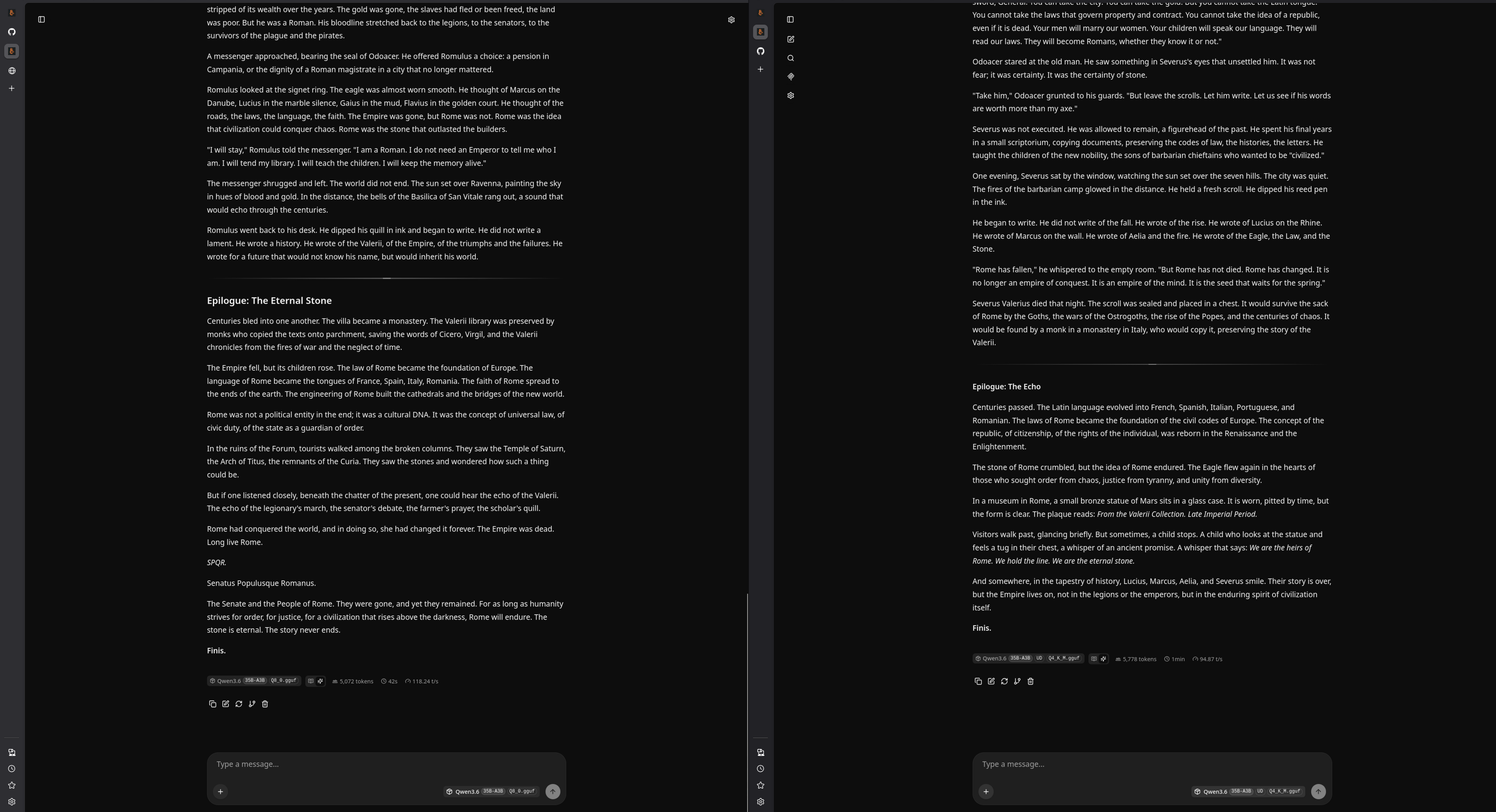
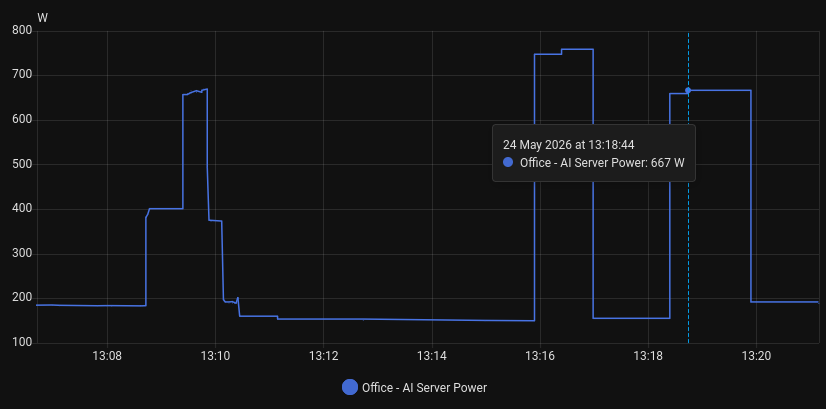
No measurable throughput loss. The energy monitoring tells the rest of the story. The screenshot at 13:16:30 shows energy draw before the change, and at 13:18:44 shows the draw after:
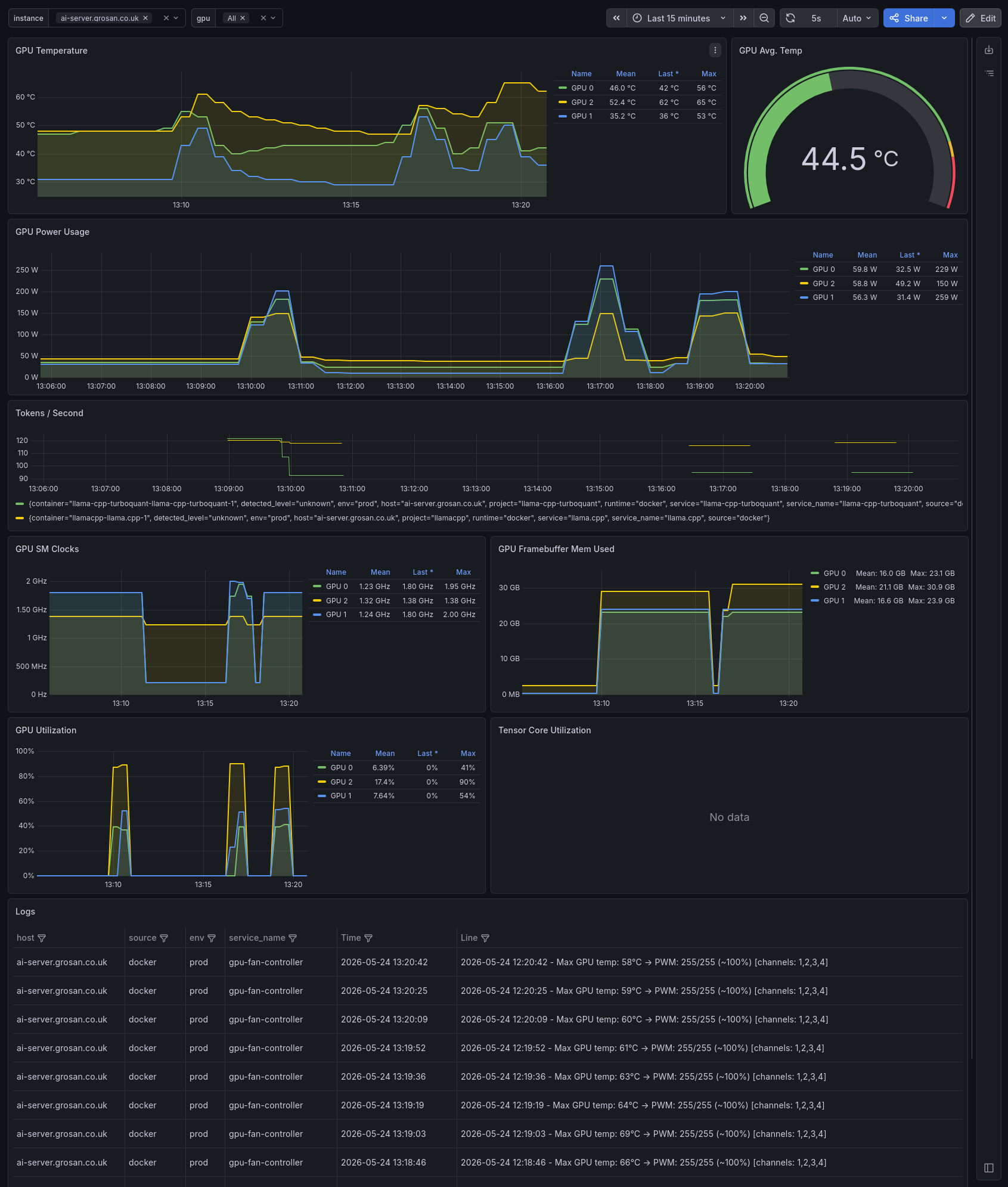
Grafana confirms the GPU power and temperature reductions:
Experiment: All GPUs at 100W
To find the floor, all three GPUs were set to 100W. The V100 handled it without issue, but the 3090s slowed down significantly:
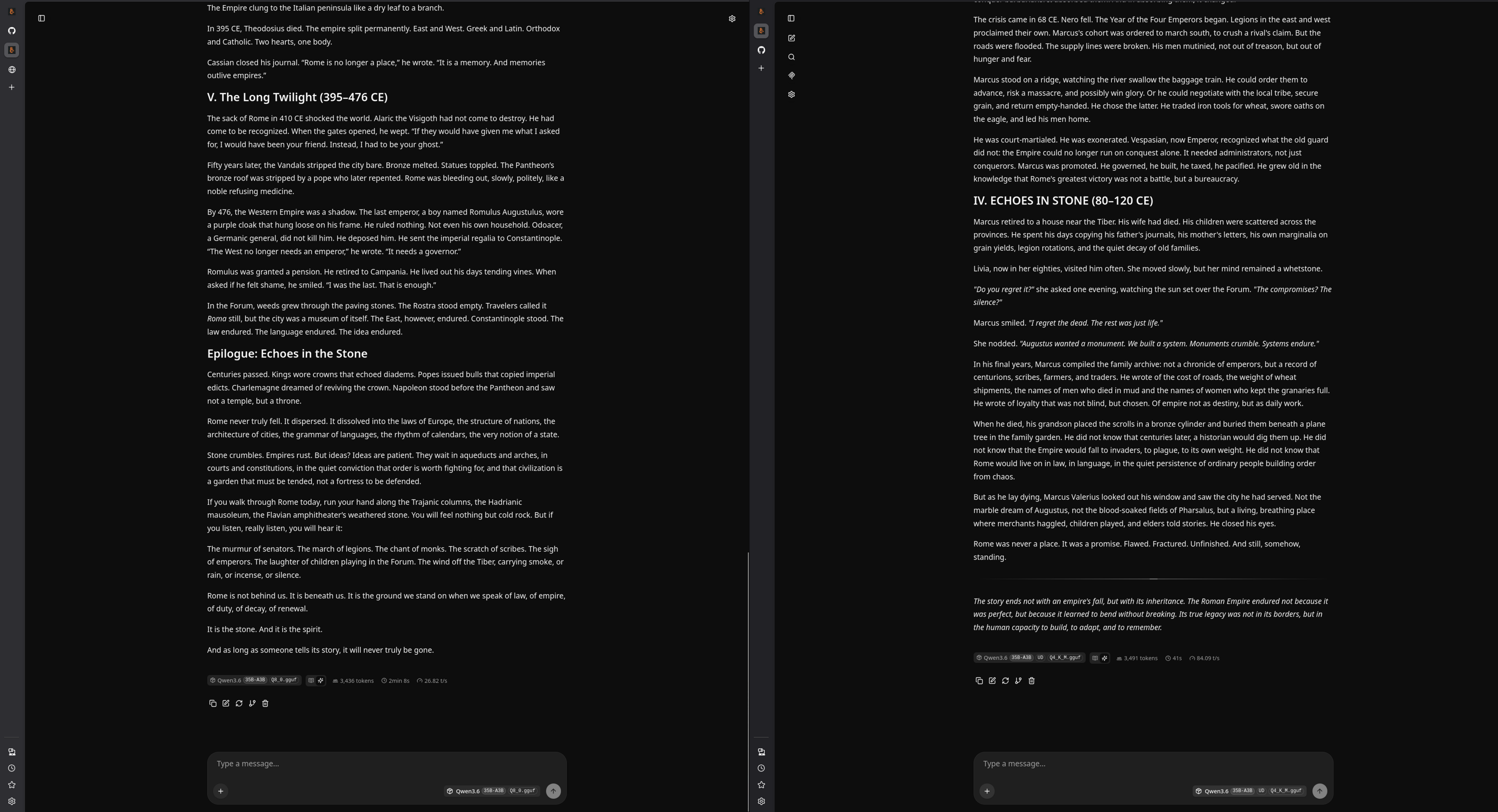
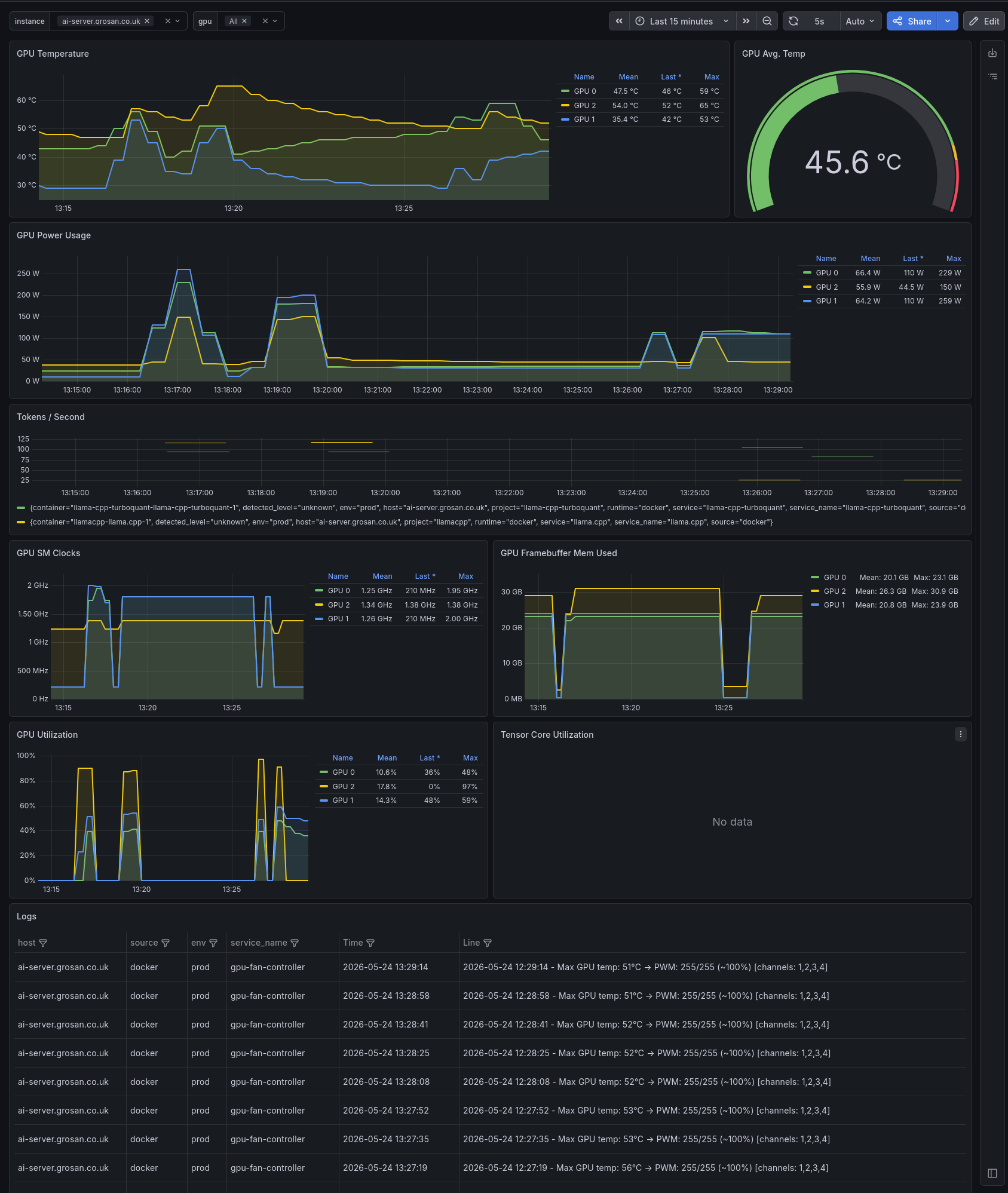
The V100 uses HBM2 memory with its own dedicated power delivery, largely independent of the core power limit. Since inference is memory-bandwidth bound and the HBM2 subsystem keeps running at full speed regardless, the V100 can be throttled aggressively without impact. The RTX 3090's GDDR6X, by contrast, shares the power budget more tightly with the core and begins to suffer at 100W.
Grafana at 100W across all GPUs:
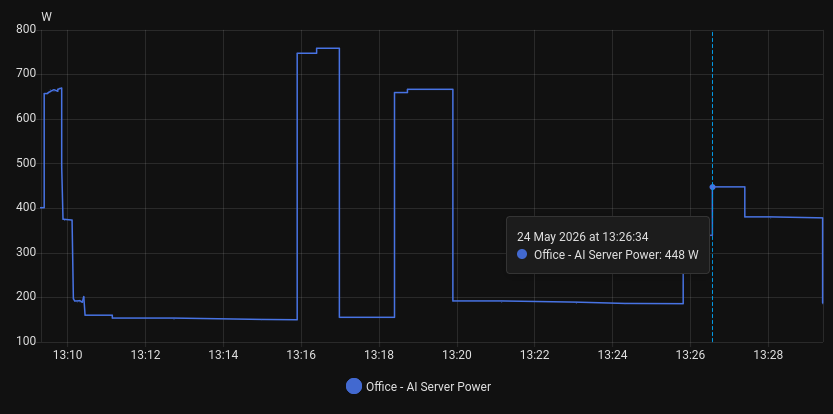
Energy draw at 100W (timestamp 13:26:24):
Experiment: 3090s at 200W
Lifting the 3090s back to 200W while keeping the V100 at 100W:

Performance fully restored. The 3090s are connected over PCIe 3.0 without P2P support, so inter-GPU communication goes through the CPU. The PCIe bus cannot feed data to the GPUs fast enough for them to fully utilise their compute at stock power, meaning the cores are partially idle even at 350W.
Experiment: 3090s at 160W
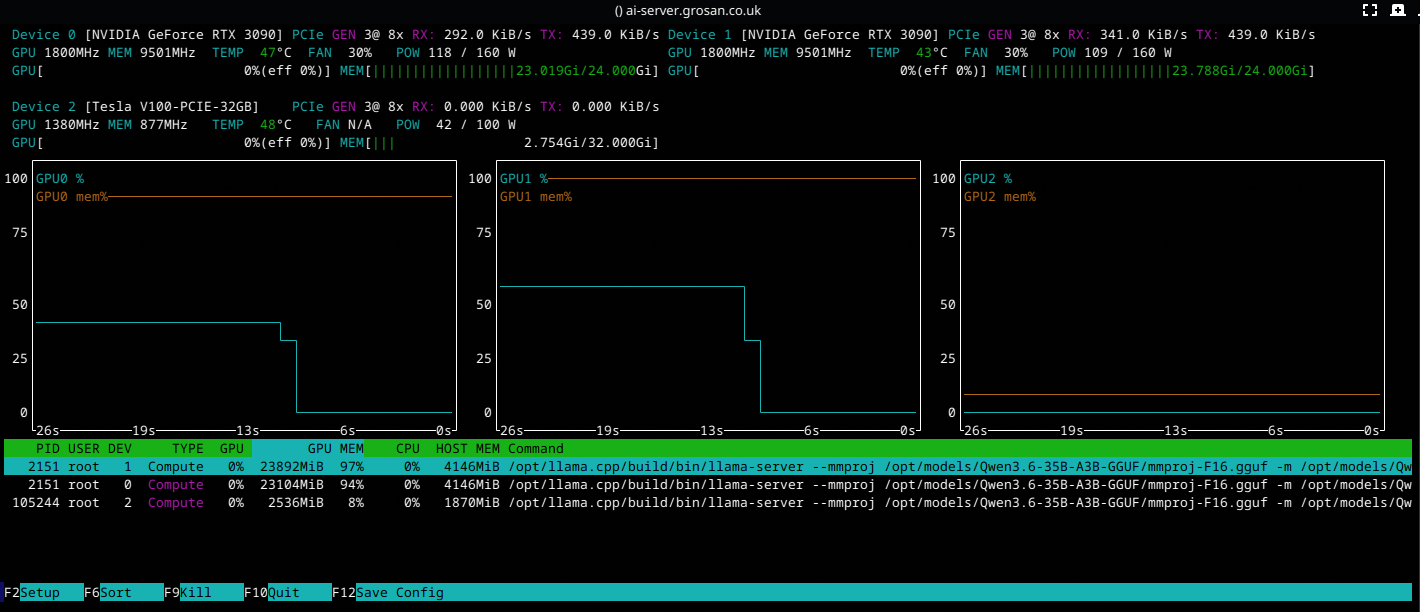
Pushing further down to 160W on the 3090s. It is worth noting that the two 3090s are not utilised at full capacity in this rig due to the lack of peer-to-peer (P2P) support and the PCIe 3.0 bus bottleneck. I plan to add an NVLink bridge to see if that improves GPU utilisation and changes where the power limit sweet spot falls.

Still no measurable throughput loss. The nvtop output confirms the GPUs are running comfortably within their power envelope:
Final Settings
The sweet spot for this rig is 160W on both 3090s and 100W on the V100. Total draw: 420W, down from 950W at stock. That is a 56% reduction with zero inference performance loss.
Why This Helps
Lower power means lower temperatures. The RTX 3090s see a 10-15°C reduction, which means quieter fans and less thermal throttling. The V100 is passively cooled and relies on a Dockerised fan controller for active cooling, so the 150W reduction keeps it well within its thermal envelope.
Lower temperatures also extend hardware lifespan. Running 24/7 AI workloads at 65°C instead of 80°C makes a measurable difference over years.
Saving 530W continuously amounts to roughly 4,643 kWh per year.
Paradoxically, undervolting can also improve inference consistency. At stock power, GPUs may thermally throttle under sustained load, causing clock speeds to oscillate between their boost target and a reduced throttle speed. With a locked, sustainable power limit, clocks hold steady and inference latency becomes more predictable.
The Configuration File
GPU settings are stored in an INI file with numbered sections. Each section identifies a GPU by UUID and optionally specifies a power limit and a clock speed lock. The script uses crudini to parse the file, which handles INI syntax natively from bash without pulling in Python or other dependencies.
[gpu:0]
uuid=GPU-9bea9fe0-8d74-f896-fab9-b7eff944607f
max_wattage=160
max_freq=1800

[gpu:1]
uuid=GPU-e085b8e2-86d1-4746-7a36-dd332a6b91f7
max_wattage=160
max_freq=1800

[gpu:2]
uuid=GPU-b637a35e-f36d-8f0a-ae09-b6935db93389
max_wattage=100
max_freq=1380
The uuid field is required. Get UUIDs by running nvidia-smi -L on the host. The max_wattage and max_freq fields are optional. If max_wattage is omitted, the script resets the GPU to its factory default power limit. If max_freq is omitted, the script unlocks clocks and lets the GPU boost normally. This means removing a value from the config and restarting the container reverts that GPU to stock behaviour.
How the Script Works
The core of the project is gpu_power_limit.sh. It runs once at container startup, iterating through the config file and applying settings to each GPU.
For each [gpu:N] section, the script:
- Reads the UUID from the config using
crudini --get. - Matches the UUID to a device index by parsing the output of
nvidia-smi -L. - Enables persistence mode on that GPU with
nvidia-smi -i $dev_index -pm 1. Without persistence mode,nvidia-smimay reset clock and power settings when no CUDA process is active. - If
max_wattageis present in the config, sets the power limit withnvidia-smi -i $dev_index -pl $max_wattage. If absent, queries the factory default with--query-gpu=power.default_limitand resets to that. - If
max_freqis present, locks the GPU clock withnvidia-smi -i $dev_index -lgc $max_freq. If absent, resets clocks to default boost behaviour withnvidia-smi -i $dev_index -rgc.
#!/bin/bash
set -uo pipefail

CONFIG="${GPU_CONFIG_PATH:-/etc/gpu-config/config.ini}"

if ! command -v crudini &>/dev/null; then
  echo "error: crudini not installed (apt install crudini)"
  exit 1
fi

if [[ ! -f "$CONFIG" ]]; then
  echo "error: config file not found: $CONFIG"
  exit 1
fi

i=0
while true; do
  section="gpu:$i"
  if ! uuid=$(crudini --get "$CONFIG" "$section" uuid 2>/dev/null); then
    break
  fi

  echo "=== $section ($uuid) ==="

  dev_index=$(nvidia-smi -L | grep -i "$uuid" | head -1 | sed 's/GPU \([0-9]*\):.*/\1/')
  if [[ -z "$dev_index" ]]; then
    echo "  warning: UUID $uuid not found on this system, skipping"
    ((i++))
    continue
  fi

  echo "  enabling persistence mode"
  nvidia-smi -i "$dev_index" -pm 1

  if max_wattage=$(crudini --get "$CONFIG" "$section" max_wattage 2>/dev/null); then
    echo "  setting power limit to ${max_wattage}W"
    nvidia-smi -i "$dev_index" -pl "$max_wattage"
  else
    default_pl=$(nvidia-smi -i "$dev_index" --query-gpu=power.default_limit --format=csv,noheader,nounits | xargs)
    echo "  resetting power limit to default (${default_pl}W)"
    nvidia-smi -i "$dev_index" -pl "$default_pl"
  fi

  if max_freq=$(crudini --get "$CONFIG" "$section" max_freq 2>/dev/null); then
    echo "  locking max clock to ${max_freq}MHz"
    nvidia-smi -i "$dev_index" -lgc "$max_freq"
  else
    echo "  resetting clocks to default"
    nvidia-smi -i "$dev_index" -rgc
  fi

  ((i++))
done

if [[ $i -eq 0 ]]; then
  echo "no gpu sections found in $CONFIG"
  exit 1
fi

echo "done, configured $i gpu(s)"
Docker Container
The container applies the GPU power configuration once at startup, then idles indefinitely. It restarts automatically on boot, reapplying the settings each time. Currently it only runs the power limit script, but I plan to extend it with CPU frequency scaling, component-level idle detection, and dynamic hardware management as mentioned earlier.
Running
git clone https://github.com/fgheorghe/ai-rig-gpu-cpu-power-limits.git
cd ai-rig-gpu-cpu-power-limits
cp config.ini.template config.ini
# Edit config.ini with your GPU UUIDs and power limits
docker compose up -d
Check that it is working:
docker compose logs -f
Expected output:
gpu-cpu-power-limits  | applying gpu power config...
gpu-cpu-power-limits  | === gpu:0 (GPU-9bea9fe0-8d74-f896-fab9-b7eff944607f) ===
gpu-cpu-power-limits  |   enabling persistence mode
gpu-cpu-power-limits  |   setting power limit to 160W
gpu-cpu-power-limits  |   locking max clock to 1800MHz
gpu-cpu-power-limits  | === gpu:1 (GPU-e085b8e2-86d1-4746-7a36-dd332a6b91f7) ===
gpu-cpu-power-limits  |   enabling persistence mode
gpu-cpu-power-limits  |   setting power limit to 160W
gpu-cpu-power-limits  |   locking max clock to 1800MHz
gpu-cpu-power-limits  | === gpu:2 (GPU-b637a35e-f36d-8f0a-ae09-b6935db93389) ===
gpu-cpu-power-limits  |   enabling persistence mode
gpu-cpu-power-limits  |   setting power limit to 100W
gpu-cpu-power-limits  |   locking max clock to 1380MHz
gpu-cpu-power-limits  | done, configured 3 gpu(s)
gpu-cpu-power-limits  | gpu config applied, idling
To verify the settings are applied, run nvidia-smi on the host and check the power limit column, or use nvidia-smi dmon -s puc -d 5 to watch clocks and power draw in real time under load.
A Note on PCIe and NVLink
On this rig, the two RTX 3090s communicate over PCIe 3.0 without peer-to-peer (P2P) support. Every tensor that needs to cross between GPUs travels GPU → PCIe → CPU → PCIe → GPU, adding latency and consuming bus bandwidth. This is why the GPUs can be power-limited so aggressively: the PCIe bus is the bottleneck, not the GPU cores.
NVLink would provide 112.5 GB/s bidirectional bandwidth between the two cards, compared to roughly 32 GB/s per slot on PCIe 3.0. I plan adding an NVLink bridge to see whether it improves GPU utilisation and shifts the power limit sweet spot. A PCIe 4.0 motherboard would also double per-slot bandwidth, though it does not solve the P2P routing issue.
For this setup, the PCIe bottleneck is effectively saving money: the GPUs cannot use more power than the bus can feed them work, so the excess wattage at stock settings was pure waste.
Conclusion
Stock GPU power settings are designed for peak gaming performance, not sustained AI inference. A simple bash script, an INI config file, and a Docker container are enough to cut power consumption by more than half on a multi-GPU inference rig without affecting throughput. The configuration is per-GPU, optional values revert to defaults when removed, and the container reapplies settings automatically on every boot.
These values are a starting point. I will continue adjusting and measuring as workloads change, and plan to add CPU and other component idle detection to further reduce power draw when the rig is not actively serving inference requests.
There is no one size fits all. Paradoxically, smaller dense models running on a single GPU need more power than MoE models split across GPUs when the bottleneck is GPU to GPU bandwidth. Try different settings, correlated with per GPU compute usage, measure inter GPU communication bandwidth and settle on what works best for you.