Layer Split Model Parallelism on Hybrid AMD NVIDIA AI Servers using Vulkan and Llama CPP
Running a single large language model across GPUs from two different vendors is not something the tooling expects you to do. CUDA is NVIDIA only. ROCm is AMD only. The one backend that talks to both is Vulkan, and llama.cpp supports it. This post documents a working setup that loads one model across an NVIDIA Tesla V100 and two AMD Radeon AI PRO R9700 cards at the same time, splitting the model by layers over the Vulkan backend inside a single Docker container.
The source code is available at github.com/fgheorghe/ai-rig-llama-container-amd-nvidia-vulkan.
Motivation
I have a mix of GPUs in one box: an NVIDIA card and two AMD cards. Individually each one runs llama.cpp fine, NVIDIA through CUDA, AMD through ROCm or Vulkan. The problem is that neither CUDA nor ROCm can see the other vendor's hardware, so the obvious way to use all three cards at once is to run separate model instances per vendor and route between them. That works, but it means three copies of weights, or three different models, never one model spanning the whole rig.
Vulkan is the way out. It is a vendor-neutral compute and graphics API, and llama.cpp's Vulkan backend enumerates every Vulkan-capable device it can find regardless of who made it. If you can get the NVIDIA and AMD drivers to both present a Vulkan device inside the same container, llama.cpp will split a single model across all of them. That is what this setup does. One model, layers distributed across the V100 and both R9700s, aggregate VRAM available to a model too large for any single card.
The catch, which I will come back to in the conclusion, is that splitting by layers across vendors is not free. But getting it to run at all is the interesting part.
The Hardware
This was developed on a single host with three GPUs on PCIe 3.0:
- GPU 0: NVIDIA Tesla V100-PCIE-32GB - data centre card, HBM2, Volta architecture
- GPU 1: AMD Radeon AI PRO R9700 - RDNA4, 32GB
- GPU 2: AMD Radeon AI PRO R9700 - RDNA4, 32GB
The two AMD cards report as RADV GFX1201 under Mesa's RADV driver. The V100 reports through the NVIDIA proprietary Vulkan driver.
There are two hardware drawbacks worth being clear about up front.
First, there is no peer-to-peer (P2P) support across these cards, and there cannot be in any meaningful sense, since they are different vendors. When a tensor needs to move from a layer on the V100 to a layer on an R9700, it does not go GPU to GPU directly. It goes GPU → PCIe → system RAM → PCIe → GPU. Every cross-device handoff in the forward pass pays that round trip. Within a single vendor you have shortcuts available: a dedicated interconnect like NVLink or Infinity Fabric, or even just PCIe peer-to-peer, which lets one card DMA directly into another's memory across the bus and skip the bounce through system RAM. P2P is common on data centre NVIDIA cards and many AMD cards, subject to motherboard and BIOS support (large BARs, ACS). Across vendors over Vulkan you get none of it, not the interconnect and not P2P, so every handoff takes the slow path.
Second, the bus is PCIe 3.0. That is roughly 16 GB/s per slot in each direction (about 32 GB/s bidirectional), and it is shared with everything else moving over the bus. Layer split parallelism only hands off activations at layer boundaries, so it is not as bandwidth hungry as tensor parallelism would be, but the combination of no P2P and PCIe 3.0 means the inter-GPU path is the slowest part of the system. The model runs, but the cards spend time waiting on each other rather than all working flat out.
A faster bus would help, slightly. PCIe 4.0 doubles per-lane bandwidth over 3.0, and more lanes scale the same way (x16 is double x8). That mostly speeds up decode, which pays a small cross-card transfer for every single token and so is sensitive to how quickly each hop completes. Prefill barely changes, since it is compute-bound and batched and the bus is not its bottleneck. So had this rig been on PCIe 4.0 the token generation rate would have come out a bit higher, while prompt processing would have looked about the same. The larger win would actually come from peer-to-peer rather than raw bus speed, since P2P removes the bounce through system RAM entirely, but that is single-vendor only and a cross-vendor split cannot use it whatever the board.
Both of these are inherent to the setup. There is no flag that fixes them. They set the ceiling on what hybrid layer split can do, and they are the reason this approach is about fitting a bigger model, not about going faster.
The Host OS
This guide assumes the host is already set up for GPU work. The exact requirements depend on which vendors' cards you are mixing. Vulkan itself is vendor-neutral, so this approach is not specific to NVIDIA plus AMD, it works for any combination of Vulkan-capable GPUs (AMD plus Intel, all-AMD, and so on). The NVIDIA-specific steps below only apply because one of the cards in this rig is an NVIDIA V100. If you have no NVIDIA card, skip them.
- NVIDIA driver loaded and functional. Check with
nvidia-smi. The driver version matters later, this rig runs 580.159.03. - amdgpu kernel driver, loaded for the Radeon cards, with the
/dev/dri/renderD*and/dev/kfddevice nodes present. - Docker, with the NVIDIA Container Toolkit installed and the
nvidiaruntime registered (again, only needed if you have an NVIDIA card). Verify withdocker info | grep -i runtime, you want to seenvidiain the list. If it is not there, runsudo nvidia-ctk runtime configure --runtime=dockerand restart Docker.
I am on the 580 proprietary driver because the Tesla V100 is Volta, an older architecture that NVIDIA's current driver branch no longer supports, so 580 is the latest I can run. Unless you are on similarly old hardware like a V100 or P40, use the most recent driver you can, and set the libnvidia-gl-NNN package in the Dockerfile to match whatever version you end up on.
You do not need ROCm installed on the host for this, the AMD side runs entirely through Mesa RADV, which the container brings its own copy of. You also do not need the Vulkan SDK on the host, that goes in the container too.
One detail that bites people: the NVIDIA Container Toolkit injects the NVIDIA driver libraries into the container at runtime, but it only mounts the Vulkan ICD if you ask for the right driver capabilities. The compose file below sets NVIDIA_DRIVER_CAPABILITIES=all for exactly this reason. With the default capability set you get CUDA libraries but no Vulkan, and the NVIDIA card silently fails to appear.
Docker Compose
The whole thing runs from one compose file. The container builds llama.cpp from source, brings its own Mesa RADV and Vulkan loader, and relies on the NVIDIA runtime to inject the NVIDIA driver.
services:
  llama-cpp-turboquant:
    restart: unless-stopped
    runtime: nvidia
    build:
      context: .
      dockerfile: Dockerfile
    ipc: host
    volumes:
      - ./llama.cpp:/opt/llama.cpp
      - ../models:/opt/models
      - ./entrypoint.sh:/opt/entrypoint.sh
      - ./cache:/root/.cache/mesa_shader_cache
    entrypoint: ["/bin/bash", "/opt/entrypoint.sh"]
    environment:
      - GGML_VK_ALLOW_GRAPHICS_QUEUE=1
      - GGML_VK_VISIBLE_DEVICES=0,1,2
      - RADV_PERFTEST=nggc,aco
      - MESA_SHADER_CACHE_DISABLE=0
      - NVIDIA_VISIBLE_DEVICES=all
      - NVIDIA_DRIVER_CAPABILITIES=all
    devices:
      - /dev/kfd:/dev/kfd
      - /dev/dri:/dev/dri
    ports:
      - "8082:8080"
    group_add:
      - video
      - "105"
    cap_add:
      - SYS_ADMIN
    security_opt:
      - seccomp=unconfined
What each part is doing:
runtime: nvidiais what triggers the NVIDIA Container Toolkit to inject the driver. Without it, theNVIDIA_*environment variables do nothing and only the AMD cards appear. The default Docker runtime isrunc, which does not inject anything.NVIDIA_DRIVER_CAPABILITIES=allmakes the toolkit mount the Vulkan ICD, not just the CUDA libraries./dev/kfdand/dev/driare the AMD side./dev/dricovers all the render and card nodes for both R9700s, no need to list them individually.GGML_VK_ALLOW_GRAPHICS_QUEUE=1is a RADV performance fix that lets the Vulkan backend use the graphics queue. On these cards it makes a large difference to throughput.GGML_VK_VISIBLE_DEVICES=0,1,2restricts llama.cpp to the three real GPUs. The Vulkan loader also enumeratesllvmpipe, a CPU software rasteriser, as a device. You never want inference landing on that, so pin the list to the real cards and confirm the indices with--list-devicesafter first boot.
When to use getent group render instead of render
Look at the group_add block. It lists video and "105", not video and render. This is deliberate.
The AMD render nodes (/dev/dri/renderD*) are owned by the render group on the host. The container needs to be a member of that group to access them. The obvious thing to write is:
    group_add:
      - video
      - render
This fails if the render group name does not exist inside the container's /etc/group:
Error response from daemon: Unable to find group render: no matching entries in group file
Docker resolves the group name against the container image, not the host. A minimal Ubuntu image has no render group, so the name cannot be resolved and the container refuses to start. The fix is to pass the numeric group ID instead, which Docker applies directly without needing a matching name inside the container. Find your host's render GID:
getent group render
This prints something like render:x:105:. Take that number, 105 here, and put it in group_add as a quoted string. Your number may differ, so check rather than copying mine. The numeric GID works whether or not the group name exists in the image, which is why it is the correct form for this setup.
Dockerfile
This is based on llama.cpp's own .devops/vulkan.Dockerfile, which is where the LunarG SDK tarball approach comes from. The reason for pulling the SDK directly rather than using distro packages is that Ubuntu's Vulkan packages, even on 24.04, are too old to build current llama.cpp, the build fails looking for glslc and up to date headers. The upstream Dockerfile sidesteps that by downloading the full LunarG SDK. On top of that base I added the kisak-mesa PPA for a current RADV (the AMD side) and the GLVND plus libnvidia-gl-580 packages (the NVIDIA side).
The container is built on Ubuntu 24.04. It installs a recent Mesa RADV for the AMD side, the GLVND libraries the NVIDIA Vulkan driver depends on, and the Vulkan SDK for the build tools, then compiles llama.cpp.
FROM ubuntu:24.04

ARG VULKAN_VERSION=1.4.321.1

RUN apt-get update && apt-get install -y \
    build-essential \
    cmake \
    git \
    wget \
    xz-utils \
    software-properties-common \
    libcurl4-openssl-dev \
    libgomp1 libomp-dev \
    && rm -rf /var/lib/apt/lists/*

RUN add-apt-repository ppa:kisak/kisak-mesa -y && \
    apt-get update && apt-get install -y \
    mesa-vulkan-drivers \
    && rm -rf /var/lib/apt/lists/*

RUN apt-get update && apt-get install -y --no-install-recommends \
    libglvnd0 libgl1 libglx0 libegl1 libgles2 \
    libnvidia-gl-580 \
    && rm -rf /var/lib/apt/lists/*

RUN ARCH=$(uname -m) \
    && wget -qO /tmp/vulkan-sdk.tar.xz \
       https://sdk.lunarg.com/sdk/download/${VULKAN_VERSION}/linux/vulkan-sdk-linux-${ARCH}-${VULKAN_VERSION}.tar.xz \
    && mkdir -p /opt/vulkan \
    && tar -xf /tmp/vulkan-sdk.tar.xz -C /opt/vulkan --strip-components=2 \
    && rm /tmp/vulkan-sdk.tar.xz

ENV VULKAN_SDK=/opt/vulkan
ENV PATH="${VULKAN_SDK}/bin:${PATH}"
ENV LD_LIBRARY_PATH="${VULKAN_SDK}/lib:${LD_LIBRARY_PATH}"

WORKDIR /opt/llama.cpp
Why each block is there:
The kisak-mesa PPA provides a much newer Mesa than Ubuntu 24.04. The R9700 is RDNA4 and benefits heavily from a current RADV. The version of Mesa is the single biggest factor in AMD Vulkan throughput on these cards, so the stock distribution package is not good enough.
The GLVND block is the part that makes the NVIDIA card work, and it is the least obvious. libglvnd0, libgl1, libglx0, libegl1 and libgles2 are the vendor-neutral GL dispatch libraries. The NVIDIA Vulkan driver, libGLX_nvidia.so.0, depends on this dispatch layer to initialise. Without it the library loads but the Vulkan loader cannot resolve vk_icdGetInstanceProcAddr from it, and the NVIDIA card never enumerates. The symptom is that AMD works perfectly and NVIDIA is simply absent, with an error like:
ERROR: loader_scanned_icd_add: Could not get 'vkCreateInstance' via
'vk_icdGetInstanceProcAddr' for ICD libGLX_nvidia.so.0
libnvidia-gl-580 is the companion package for the NVIDIA 580 driver series, which matches the host driver. The digit must match your host. If you upgrade the host NVIDIA driver, bump this to match, otherwise the GL libraries in the container will not line up with the driver the toolkit injects at runtime. The 580 here is only correct because this rig is pinned to that series for the legacy V100, on a modern GPU you would match whatever current driver you are running, for example libnvidia-gl-570 or newer. If that package is not available in your apt sources, add ppa:graphics-drivers/ppa before this block.
The mesa_shader_cache volume from the compose file is worth keeping. RADV compiles shaders on first use, and caching them across container restarts removes a noticeable warm-up delay.
Entrypoint
The entrypoint script builds llama.cpp if it has not been built yet, prints the Vulkan device summary so you can confirm all three cards are present, then launches the server.
#!/bin/bash
set -e

BUILD_DIR="/opt/llama.cpp/build"

git config --global --add safe.directory /opt/llama.cpp

if [ ! -f "$BUILD_DIR/bin/llama-server" ] || [ "${REBUILD}" = "1" ]; then
    echo "Building llama.cpp with Vulkan support..."
    rm -rf "$BUILD_DIR"
    cmake -B "$BUILD_DIR" \
        -DGGML_VULKAN=ON \
        -DGGML_NATIVE=ON \
        -DBUILD_SHARED_LIBS=OFF \
        -DCMAKE_BUILD_TYPE=Release
    cmake --build "$BUILD_DIR" --config Release -j"$(nproc)" || { echo "BUILD FAILED"; sleep 9999; }
    echo "Build complete."
else
    echo "Using existing build. Set REBUILD=1 to force rebuild."
fi

vulkaninfo --summary

exec "$BUILD_DIR/bin/llama-server" \
    --mmproj /opt/models/Qwen3.6-35B-A3B-GGUF/mmproj-F16.gguf \
    -m /opt/models/Qwen3.6-35B-A3B-GGUF/Qwen3.6-35B-A3B-Q8_0.gguf \
    -ngl 99999 \
    -c 262144 \
    -n 131072 \
    --main-gpu 2 \
    --mmproj-offload \
    --image-min-tokens 2048 \
    --split-mode layer \
    -fit off \
    --cache-ram 0 \
    --no-warmup \
    --host 0.0.0.0 \
    --port 8080 \
    --kv-unified \
    --flash-attn on \
    --jinja \
    --parallel 2 \
    --batch-size 16384 \
    --ubatch-size 2048 \
    --no-context-shift \
    --sleep-idle-seconds 300 \
    --reasoning-format deepseek \
    --reasoning-budget -1 \
    -ctk q8_0 -ctv q8_0 \
    "$@"
What it does and why:
The build guard only compiles llama.cpp when there is no existing binary, or when REBUILD=1 is set. Since the source is bind-mounted from the host, the build survives container restarts and you are not recompiling on every boot. The sleep 9999 on build failure keeps the container alive so you can exec in and read the error instead of it dying immediately.
vulkaninfo --summary before launch is the sanity check. You want to see two RADV GFX1201 devices and the Tesla V100 listed before the server starts. If the V100 is missing, the GLVND or runtime setup is wrong, and there is no point continuing.
The important server flags for this setup:
--split-mode layeris the whole point, layer split model parallelism. Each card holds a contiguous block of the model's layers.-ngl 99999offloads all layers to GPU. Any number larger than the layer count means "all of them".--main-gpu 2puts the output and scratch tensors on one of the R9700s rather than the slower V100.-ctk q8_0 -ctv q8_0quantises the KV cache to 8 bit, halving its memory footprint versus f16. This matters at the 262144 context size set here.--flash-attn onis required for the quantised value cache to actually engage. Without flash attention the quantised V cache will not work.--kv-unifiedallocates the KV cache as a single buffer.-fit offand--cache-ram 0disable automatic fitting and host RAM spill, so the model either fits in VRAM or fails loudly. Useful while tuning, since a silent spill to system RAM would wreck throughput without telling you.
Users must clone the llama.cpp source into ./llama.cpp before first run, since the container builds from a bind mount rather than fetching it:
git clone git@github.com:ggml-org/llama.cpp.git ./llama.cpp
Results
With all three cards enumerating, the model loads and splits across them. Here is the rig serving Qwen3.6-35B-A3B at Q8, the V100 and both R9700s all holding part of the model:
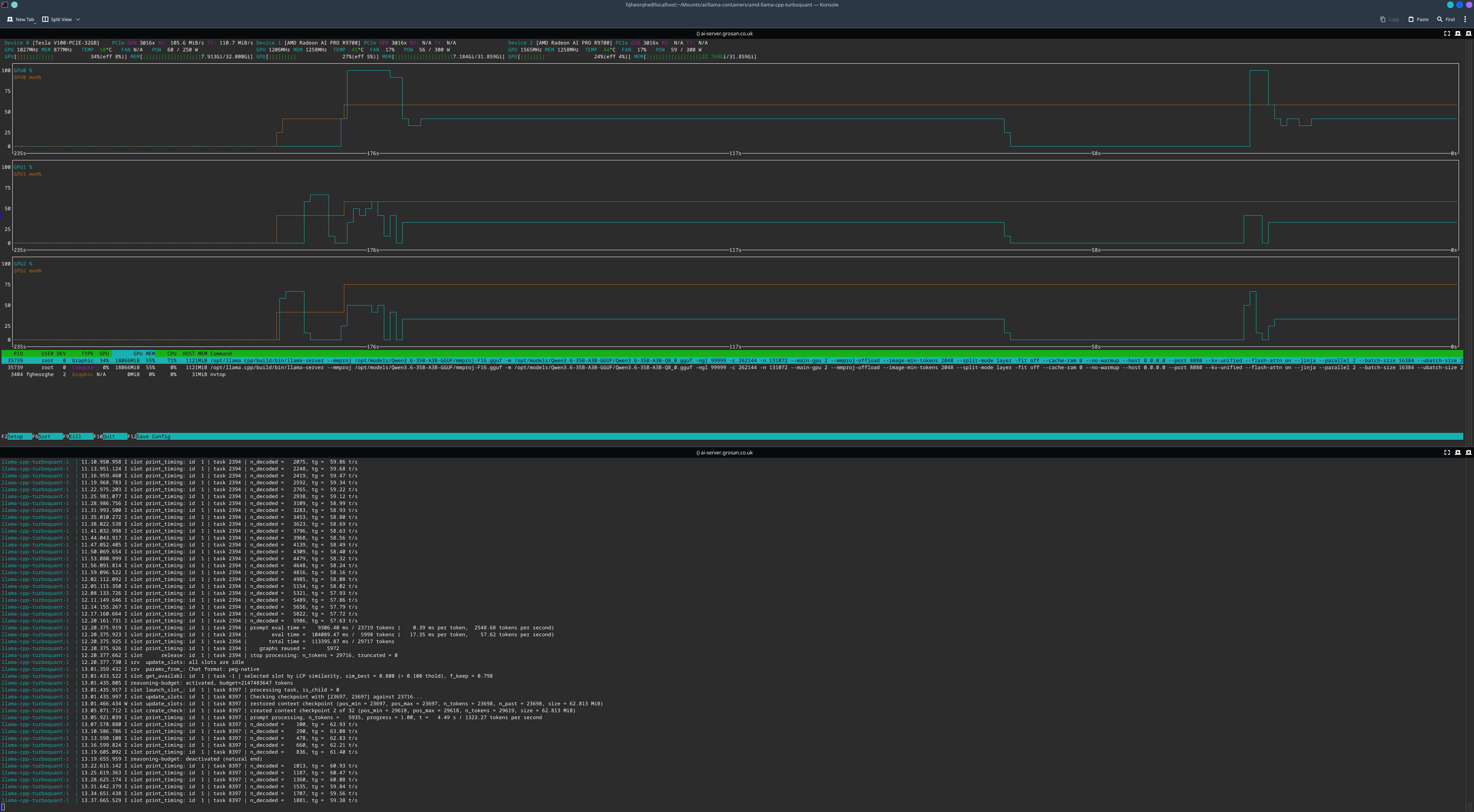
The numbers from a representative request:
prompt processing, n_tokens = 16384, progress = 0.69, t = 4.42 s / 3702.94 tokens per second
prompt processing, n_tokens = 21667, progress = 0.91, t = 7.42 s / 2921.90 tokens per second
prompt processing, n_tokens = 23698, progress = 1.00, t = 8.16 s / 2904.12 tokens per second
n_decoded = 100, tg = 63.92 t/s
n_decoded = 290, tg = 63.37 t/s
n_decoded = 474, tg = 62.49 t/s
n_decoded = 656, tg = 61.97 t/s
n_decoded = 839, tg = 61.72 t/s
Prompt processing runs at roughly 2900 to 3700 tokens per second, and token generation settles at around 62 tokens per second across a long decode. The decode rate is steady, which is what you want, no oscillation as the context grows.
Conclusion
This works, and one model now spans three GPUs from two vendors over a single backend. That is the goal: aggregate VRAM, one set of weights, a model larger than any single card could hold.
Layer split across vendors buys you capacity. It does not buy you speed. With no P2P and PCIe 3.0, every layer boundary that crosses between the V100 and the AMD cards pays a round trip through system RAM, and the slowest card in the chain gates the rest. The V100 is an older architecture than the R9700s, so in a layer split it tends to set the pace. If your goal is maximum throughput rather than maximum model size, you will often do better running separate single-vendor instances and routing between them, the two R9700s on Vulkan as one server, the V100 as another.
The reason to do it this way is when you have a single model that will not fit on either vendor's cards alone, and you would rather run it slowly across everything than not at all. For that case, this is the setup. Get the GLVND libraries in, use the numeric render GID, let the NVIDIA toolkit inject its own ICD, and llama.cpp does the rest.